<?xml version="1.0" encoding="utf-8" standalone="yes"?>
<feed xmlns="http://www.w3.org/2005/Atom">
  <title>Threat-Modeling on Sooraj Sathyanarayanan</title>
  <link rel="alternate" href="https://profincognito.me/tags/threat-modeling/" />
  <link rel="self" href="https://profincognito.me/tags/threat-modeling/index.xml" />
  <subtitle>Recent content in Threat-Modeling on Sooraj Sathyanarayanan</subtitle>
  <id>https://profincognito.me/tags/threat-modeling/</id>
  <generator uri="http://gohugo.io" version="0.147.8">Hugo</generator>
  <language>en-us</language>
  <updated>2026-06-10T15:20:29-07:00</updated>
  <author>
    <name>Sooraj Sathyanarayanan</name>
    
  </author>
  <rights>[CC BY-SA 4.0](https://creativecommons.org/licenses/by-sa/4.0/)</rights>
      <entry>
        <title>Personal Digital Threat Modeling: A Practical Guide to OPSEC for Everyone</title>
        <link rel="alternate" href="https://profincognito.me/blog/privacy/threat-modeling-guide/" />
        <id>https://profincognito.me/blog/privacy/threat-modeling-guide/</id>
        <published>2026-03-04T00:00:00Z</published>
        <updated>2026-06-10T15:20:29-07:00</updated>
        <summary type="html">A comprehensive guide to understanding and implementing personal digital threat modeling and operational security (OPSEC). Learn how to identify your digital assets, assess potential threats, and develop practical strategies to protect yourself.</summary>
          <content type="html"><![CDATA[<p>Balancing security, privacy, and usability is one of the first (and trickiest) hurdles you face when improving your digital security. Every new layer of protection usually brings some level of inconvenience—prompting many to give up on privacy tools before they’ve even started.</p>
<p><img loading="lazy" src="/images/content/blog-privacy-threat-modeling-guide-8671eb75-e989-4c56-9167-047cc043b724.png" alt="image" />
</p>
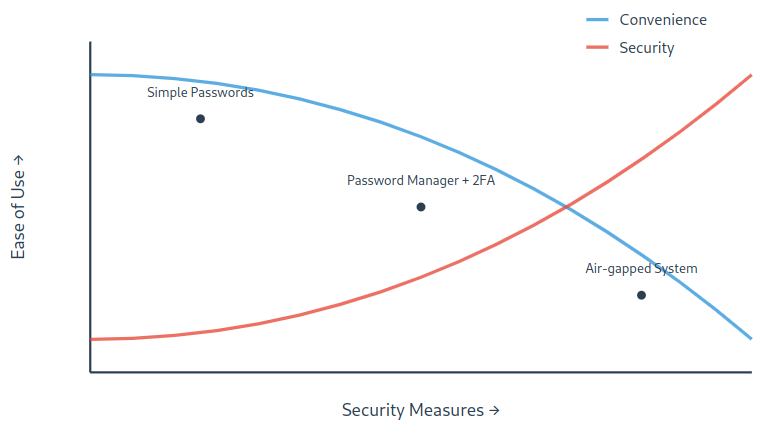
<p><em>As security measures become more robust, they often require more effort and reduce convenience. Finding your ideal balance point depends on your specific needs and threat model.</em></p>
<p>That’s where <strong>threat modeling</strong> comes in. By identifying which concerns truly apply to your situation, you can stop wasting energy on extreme measures you don’t need—and avoid neglecting threats that really do matter. In short, a good threat model keeps your security plan both <strong>focused</strong> and <strong>manageable</strong>.</p>
<h2 id="why-threat-modeling-matters">Why Threat Modeling Matters</h2>
<p>No one can be perfectly secure, no matter how advanced the tools. Realistically, you aim for <strong>high security</strong>—protecting your most valuable information against the threats you’re most likely to face. Threat modeling is the process that helps you:</p>
<ol>
<li><strong>Clarify your unique concerns</strong> (e.g., identity theft, invasive acquaintances, state surveillance).</li>
<li><strong>Choose appropriate measures</strong> based on how likely each threat is and how severe the consequences could be.</li>
</ol>
<p>Instead of trying every privacy tool out there, you focus on a tailored set of protections that fit your life.</p>
<h2 id="five-key-questions-for-building-your-threat-model">Five Key Questions for Building Your Threat Model</h2>
<p><img loading="lazy" src="/images/content/blog-privacy-threat-modeling-guide-6391f5c1-e375-4ddc-8ef7-7a81dc361828.png" alt="image" />
</p>
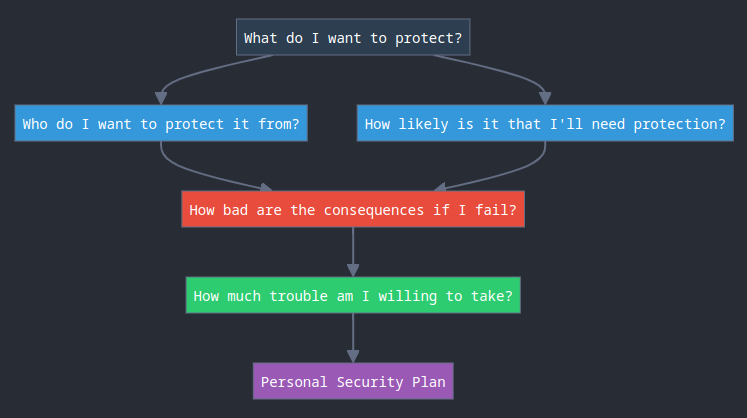
<p>A classic approach to threat modeling involves asking five foundational questions. You’ll see this framework in various privacy and security guides, including the <a href="https://ssd.eff.org">EFF</a> and <a href="https://www.privacyguides.org">Privacy Guides</a>. It’s popular because it covers the essentials without overwhelming you.</p>
<h3 id="1-what-do-i-want-to-protect">1. What Do I Want to Protect?</h3>
<p>Your <strong>assets</strong> are anything you consider valuable—often information:</p>
<ul>
<li>Emails, chat logs, or contact lists</li>
<li>Private documents, photos, or videos</li>
<li>Real-time location or movement data</li>
<li>Physical devices (phones, laptops, external drives)</li>
</ul>
<p>Start with a simple list of assets. Note where they’re stored (device, cloud, backup drive) and who currently has access (family, friends, service providers).</p>
<h3 id="2-who-do-i-want-to-protect-it-from">2. Who Do I Want to Protect It From?</h3>
<p>An <strong>adversary</strong> is anyone with a motive to access or misuse your assets:</p>
<ul>
<li>Nosy coworkers or an ex-partner</li>
<li>Random hackers or cybercriminals</li>
<li>Data-hungry corporations or governments</li>
<li>Someone on public Wi-Fi looking for easy targets</li>
</ul>
<p>Not all adversaries apply to everyone. Tailor this list to your situation—someone dealing with trade secrets might worry about corporate espionage, while others may fear identity thieves.</p>
<h3 id="3-how-likely-is-it-that-i-will-need-to-protect-it">3. How Likely Is It That I Will Need to Protect It?</h3>
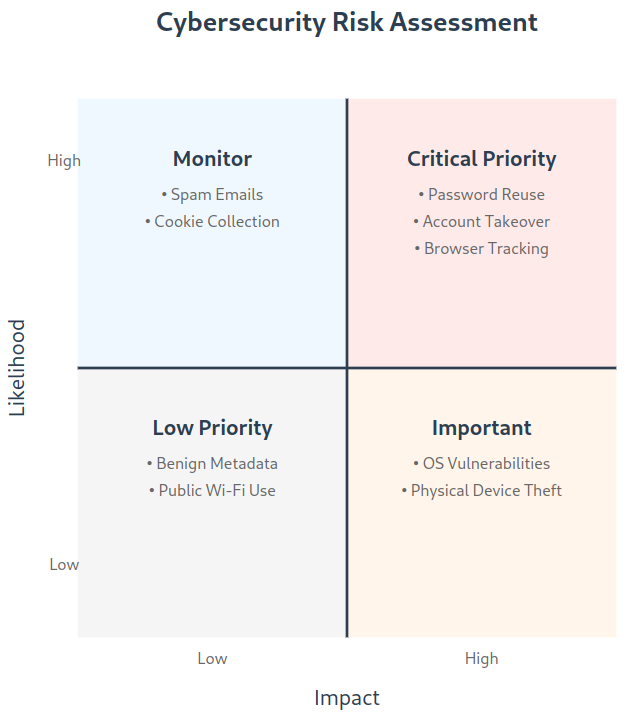
<p>This refers to <strong>risk</strong>—the probability of a threat becoming reality. Some threats are technically possible but extremely unlikely. For instance, your mobile provider might have access to your call data, but the chance they’ll expose that data publicly to harm you might be minimal.</p>
<p>Aim your efforts at the threats you genuinely encounter or feel are plausible. If you frequently receive phishing emails or suspicious direct messages, prioritize preventing social engineering attacks.</p>
<p><img loading="lazy" src="/images/content/blog-privacy-threat-modeling-guide-06a3f8d7-e8c3-46a7-9a8e-6a83f23dbe72.png" alt="image" />
</p>
<p><em>This matrix helps visualize how to prioritize different security threats based on their likelihood and potential impact.</em></p>
<h3 id="4-how-bad-are-the-consequences-if-i-fail">4. How Bad Are the Consequences If I Fail?</h3>
<p>Imagine if your adversary succeeds: <strong>What happens to you?</strong> Could they lock you out of important accounts, sell personal data, or damage your reputation?</p>
<p>Consider the <strong>capabilities</strong> of each adversary. A local hacker might only intercept insecure traffic on public Wi-Fi, whereas a government agency can compel phone companies to hand over records. This helps you gauge which scenarios call for stronger protections.</p>
<h3 id="5-how-much-trouble-am-i-willing-to-go-through">5. How Much Trouble Am I Willing to Go Through?</h3>
<p>Security and convenience don’t always get along. The tighter you lock things down, the more extra steps you take each day. If you’re managing highly sensitive material (e.g., a journalist safeguarding sources, an attorney handling privileged information), the hassle might be justified. For casual web browsing, you might opt for simpler, albeit less airtight, solutions.</p>
<p>Being realistic about your comfort level will keep your security habits sustainable in the long run.</p>
<h2 id="a-simple-analogy-protecting-your-home">A Simple Analogy: Protecting Your Home</h2>
<p>If all this feels daunting, think of your physical belongings:</p>
<ol>
<li>
<p><strong>What am I protecting?</strong><br>
Important documents, family photos.</p>
</li>
<li>
<p><strong>Who might try to steal them?</strong><br>
Burglars, houseguests, or maybe a suspicious roommate.</p>
</li>
<li>
<p><strong>How likely is a break-in?</strong><br>
High-crime neighborhood or rarely any issues?</p>
</li>
<li>
<p><strong>What happens if someone succeeds?</strong><br>
Some items may be irreplaceable; others might be covered by insurance.</p>
</li>
<li>
<p><strong>How much inconvenience is acceptable?</strong><br>
Maybe you install a good door lock or buy a small safe—versus adding motion sensors, cameras, and a steel-reinforced door.</p>
</li>
</ol>
<p>The same logic applies to digital assets: The more valuable or irreplaceable the data, and the more likely it is to be targeted, the more effort you’ll invest in security.</p>
<h2 id="crafting-a-tailored-security-plan">Crafting a Tailored Security Plan</h2>
<p>Once you’ve answered these questions, you can match your <strong>tools and habits</strong> to your actual concerns:</p>
<ul>
<li><strong>Worried about account takeovers?</strong>
<ul>
<li>Use unique, strong passwords in a password manager, and turn on two-factor authentication (2FA) everywhere possible.</li>
</ul>
</li>
<li><strong>Anxious about government surveillance?</strong>
<ul>
<li>Consider secure messaging apps (e.g., Signal), and a reputable VPN or Tor for sensitive browsing.</li>
</ul>
</li>
<li><strong>Need to keep casual snoops at bay?</strong>
<ul>
<li>Keep devices updated, be cautious with links in emails or messages, and watch out for unsecured public Wi-Fi.</li>
</ul>
</li>
</ul>
<p>You don’t need to do everything—focus on what’s truly relevant in your daily life.</p>
<h2 id="learn-more-with-privacy-guides-online-learning">Learn More with Privacy Guides Online Learning</h2>
<p>For a structured introduction to this process, check out the free <a href="https://learn.privacyguides.org">Privacy Guides Online Learning course</a>. They emphasize that:</p>
<blockquote>
<p>Since you can’t defend against every possible attack, focusing on the threats that most affect you is the best way to pick the right security tools.</p></blockquote>
<p>This concise course is perfect if you’re looking for a guided path to set up a threat model from scratch, helping you refine your personal security measures without getting overwhelmed.</p>
<h2 id="wrapping-up-and-next-steps">Wrapping Up and Next Steps</h2>
<p>Threat modeling keeps your digital security plan realistic and efficient. By answering a few basic questions—about your assets, potential adversaries, likelihood of threats, possible consequences, and your personal tolerance for inconvenience—you can make smarter decisions about which privacy tools to adopt.</p>
<p>No single technique or application eliminates every vulnerability. <strong>Security is an ongoing process</strong> that evolves as your life and circumstances change. Revisit your threat model whenever you change jobs, move somewhere new, experience a major life event, or notice suspicious activity around your accounts.</p>
<p>For additional detailed guidance, check out the <a href="https://ssd.eff.org">Electronic Frontier Foundation’s Surveillance Self-Defense resources</a>. They offer a wealth of advice suited to varying threat levels and scenarios.</p>
<p>With a clear threat model and the right tools, you’ll strike a comfortable balance between privacy, security, and convenience. It’s a continuous journey—every step you take gets you closer to a safer, more private life online.</p>
<hr>
<p><em>Stay safe, stay curious, and keep learning. Your digital security is in your hands!</em></p>
]]></content>
      </entry>
      <entry>
        <title>The Truth About VPNs: Untangling the Hype, the Lies, and the Reality</title>
        <link rel="alternate" href="https://profincognito.me/blog/privacy/the-truth-about-vpns/" />
        <id>https://profincognito.me/blog/privacy/the-truth-about-vpns/</id>
        <published>2026-03-04T00:00:00Z</published>
        <updated>2026-06-10T15:20:29-07:00</updated>
        <summary type="html">A comprehensive technical analysis of VPN technology, privacy myths, security implications, and how to evaluate VPN providers beyond marketing claims.</summary>
          <content type="html"><![CDATA[<p>If you’ve browsed the web lately, you’ve probably seen ads for “life-changing” VPN services: just hit a button and poof—complete online invisibility, ironclad security, and the freedom to roam the web without a care. Except, that’s mostly marketing smoke and mirrors. As a privacy and security researcher, I’ve witnessed the VPN industry explode with bold claims and affiliate-driven hype. While a VPN can be useful, it’s not a magic cloak of anonymity and protection. In this post, we’ll dissect myths, set realistic expectations, and give you a framework to choose a VPN (if you truly need one).</p>
<h2 id="how-a-vpn-actually-works">How a VPN Actually Works</h2>
<p>Before diving into myths and misconceptions, let&rsquo;s understand how a VPN actually works:</p>
<p><img loading="lazy" src="/images/content/blog-privacy-the-truth-about-vpns-d6f34ae8-2207-4ffd-8594-b674a89f0fd9.png" alt="image" />
</p>
<h2 id="myth-vs-reality-common-misconceptions-about-vpns">Myth vs. Reality: Common Misconceptions About VPNs</h2>
<h3 id="myth-1-vpns-make-you-anonymous-online">Myth #1: “VPNs Make You Anonymous Online”</h3>
<p><strong>Reality:</strong> A VPN primarily hides your IP address and encrypts traffic between you and the VPN server. But it does not:</p>
<ul>
<li>Stop browser fingerprinting, where unique device traits can still identify you.</li>
<li>Erase your logged-in identities—Google, Facebook, and others know it’s you if you’re signed in.</li>
<li>Prevent invasive trackers and cookies from following you.</li>
<li>Evade sophisticated traffic analysis from powerful adversaries.</li>
</ul>
<p>If anonymity is your endgame, consider using <a href="https://www.torproject.org/">Tor</a>, which distributes trust across multiple relays rather than placing it all in one company’s hands.</p>
<h3 id="myth-2-vpns-provide-robust-security-everywhere">Myth #2: “VPNs Provide Robust Security Everywhere”</h3>
<p><strong>Reality:</strong> In the early days of the web, a VPN could add an important security layer by encrypting your connection to sites that didn’t use HTTPS. Today, over 95% of websites support HTTPS, so that particular benefit is minimal. A VPN can still protect your data on hostile networks (like open public Wi-Fi), but it won’t secure you if:</p>
<ul>
<li>The site you visit is already malicious.</li>
<li>Your own system is compromised with malware.</li>
<li>The service you’re using is unencrypted at the application level.</li>
</ul>
<p>The “security” a VPN provides is mostly about encrypting the link between you and the VPN server—everything after that point remains just as exposed as it would without the VPN.</p>
<h3 id="myth-3-all-vpn-providers-are-trustworthy-no-logs-guaranteed">Myth #3: “All VPN Providers Are Trustworthy, ‘No Logs’ Guaranteed”</h3>
<p><strong>Reality:</strong> VPN marketing thrives on trust. But remember:</p>
<ul>
<li>“No logs” claims are unverifiable from your perspective.</li>
<li>Providers have lied before, quietly logging user data and handing it over to authorities.</li>
<li>The legal jurisdiction of the provider matters. Some countries can legally compel logging.</li>
<li>Reputable providers rely on independent audits, transparent policies, and proven track records—not just slogans.</li>
</ul>
<p>At the end of the day, you’re shifting trust from your ISP to a single VPN provider. If they want, they can log everything. You can’t “see” what they do behind the scenes.</p>
<h3 id="myth-4-free-vpns-are-just-as-good-as-paid-ones">Myth #4: “Free VPNs Are Just as Good as Paid Ones”</h3>
<p><strong>Reality:</strong> Running a VPN service—servers, bandwidth, maintenance—is expensive. Free VPNs often:</p>
<ul>
<li>Sell your browsing data to advertisers or brokers.</li>
<li>Inject ads or malicious scripts into your traffic.</li>
<li>Offer poor performance and outdated security.</li>
<li>Provide little to no transparency or accountability.</li>
</ul>
<p>When you’re not paying with money, you’re likely paying with your privacy or security.</p>
<h3 id="myth-5-vpns-block-all-hacking-attempts">Myth #5: “VPNs Block All Hacking Attempts”</h3>
<p><strong>Reality:</strong> A VPN is not a cure-all security blanket. It will not:</p>
<ul>
<li>Filter out malware or phishing attacks.</li>
<li>Protect against compromised websites.</li>
<li>Patch known vulnerabilities in your system.</li>
<li>Guarantee protection against advanced surveillance tools.</li>
</ul>
<p>A VPN can help obscure your network traffic, but it won’t magically fix other security issues. Consider it just one layer in a broader security strategy.</p>
<h3 id="myth-6-high-price--high-quality">Myth #6: “High Price = High Quality”</h3>
<p><strong>Reality:</strong> Some expensive VPNs burn through cash on marketing instead of improving infrastructure or auditing their software. Meanwhile, affordable providers like Mullvad charge a flat rate and invest heavily in transparency, regular audits, and robust protocols. Don’t be dazzled by price—evaluate providers by their reputation, technical competence, and community trust.</p>
<h3 id="myth-7-vpns-always-bypass-geo-restrictions">Myth #7: “VPNs Always Bypass Geo-Restrictions”</h3>
<p><strong>Reality:</strong> While a VPN can help access region-locked content, streaming platforms have wised up. They blacklist known VPN IPs, and many censorship-heavy countries actively target VPN traffic. Bypassing these restrictions is hit-or-miss and may require trying multiple servers or more specialized solutions.</p>
<h3 id="myth-8-military-grade-encryption-means-something-special">Myth #8: “‘Military-Grade Encryption’ Means Something Special”</h3>
<p><strong>Reality:</strong> The phrase “military-grade encryption” is pure marketing fluff. Most reputable VPNs use standard ciphers like AES-256, already considered secure. What truly matters:</p>
<ul>
<li>The chosen protocol (e.g., OpenVPN, WireGuard)</li>
<li>Proper key exchange methods</li>
<li>Perfect forward secrecy</li>
<li>Code audits and careful implementation</li>
</ul>
<h3 id="myth-9-using-a-vpn-at-home-is-suspicious">Myth #9: “Using a VPN at Home is Suspicious”</h3>
<p><strong>Reality:</strong> VPNs have plenty of legitimate uses:</p>
<ul>
<li>Protecting your data on public Wi-Fi</li>
<li>Masking your IP from certain sites or services</li>
<li>Testing region-specific website features</li>
<li>Avoiding ISP throttling</li>
</ul>
<p>They’re tools. What matters is how you use them.</p>
<h2 id="how-to-evaluate-a-vpn-provider">How to Evaluate a VPN Provider</h2>
<p><strong>Check Protocols &amp; Infrastructure:</strong><br>
Look for modern, well-regarded protocols like WireGuard or OpenVPN. Ensure they offer DNS leak protection, IPv6 support, and clear technical documentation.</p>
<p><strong>Seek Transparency &amp; Audits:</strong><br>
A trustworthy VPN undergoes regular independent audits, publishes transparency reports, and maintains a clear no-logs policy backed by legal action or proven conduct.</p>
<p><strong>Assess Jurisdiction &amp; Culture:</strong><br>
Where the VPN operates matters. Providers in privacy-friendly jurisdictions have fewer legal obligations to store or surrender data. Also consider a provider’s stance on privacy activism and openness.</p>
<p><strong>Look for Extra Security Features:</strong></p>
<ul>
<li><strong>Kill Switch:</strong> Stops traffic if the VPN drops, preventing accidental IP leaks.</li>
<li><strong>Perfect Forward Secrecy:</strong> Ensures compromised keys can’t decrypt past traffic.</li>
<li><strong>Open-Source Clients:</strong> Auditable code reduces the risk of hidden backdoors.</li>
</ul>
<h2 id="when-a-vpn-can-help">When a VPN Can Help</h2>
<p>A VPN can:</p>
<ul>
<li>Reduce your ISP’s visibility into the sites you visit.</li>
<li>Help you appear to come from another location, potentially dodging basic IP-based tracking.</li>
<li>Add a layer of encryption on hostile networks where HTTPS might not be a given (though that’s increasingly rare).</li>
</ul>
<p>If your needs are very basic—like temporarily hiding your IP or bypassing a local restriction—a VPN might suffice. But remember, you’re trusting the VPN provider completely.</p>
<h2 id="if-you-need-real-anonymity-or-robust-privacy">If You Need Real Anonymity or Robust Privacy</h2>
<p>VPNs are not anonymity tools. If you require genuine anonymity for critical reasons:</p>
<ul>
<li>Consider using Tor, which distributes trust over multiple relays rather than a single VPN server.</li>
<li>Use end-to-end encrypted services and proper operational security measures.</li>
</ul>
<p>Tor isn’t perfect, but it’s designed with anonymity and privacy at its core, unlike commercial VPN services that rely on your trust and can’t be easily verified.</p>
<h2 id="vpn-providers-worth-checking-out">VPN Providers Worth Checking Out</h2>
<p>While no provider is flawless, some strive for honesty and transparency:</p>
<ul>
<li><strong><a href="https://mullvad.net/en">Mullvad</a>:</strong> No email required, independent audits, support for WireGuard, simple flat pricing, no flashy promises.</li>
<li><strong><a href="https://protonvpn.com">Proton VPN</a>:</strong> From the team behind ProtonMail, it’s audited, publishes transparency reports, and has open-source clients.</li>
<li><strong><a href="https://www.ivpn.net/en">IVPN</a>:</strong> Transparent ownership, ethical marketing, strong privacy policies, and good community standing.</li>
</ul>
<p>These companies focus on realistic promises—encryption, privacy improvements, and resisting surveillance—without the snake-oil.</p>
<h2 id="conclusion">Conclusion</h2>
<p>A VPN won’t magically vanish all online threats or grant you total anonymity. Most of the web is already encrypted via HTTPS, minimizing some of the VPN’s original security advantages. What a VPN does is shift trust from your ISP to your VPN provider, and not all are worthy of that trust.</p>
<p>To improve your online privacy and security:</p>
<ul>
<li>Use hardened browsers, anti-tracking measures, and careful operational security.</li>
<li>Don’t assume a VPN solves all problems—approach their claims with healthy skepticism.</li>
<li>If your goal is strong anonymity, skip the VPN and consider Tor.</li>
</ul>
<p>In the end, VPNs are simply tools. Understand their limitations, pick providers that value transparency, and set realistic expectations. Hopefully with this knowledge, you can navigate the crowded VPN marketplace confidently and make choices that truly align with your privacy goals.</p>
]]></content>
      </entry>

</feed>