Why Choose Decentralization?
Before we dive into the technical steps, it’s essential to understand the benefits of a decentralized website:
- Complete Ownership: You retain full control over your domain and content without relying on traditional hosting providers.
- Enhanced Resilience: Decentralized hosting eliminates single points of failure, ensuring your site remains accessible even if individual nodes go down.
- Censorship Resistance: Your content is free from central authority control, promoting freedom of expression.
- Privacy & Security: Improved data protection and ownership reduce the risk of data breaches and unauthorized access.
- Web3 Ready: Native blockchain integration opens doors to advanced features like smart contracts and decentralized applications (dApps).
Understanding the Architecture
Before we dive into the technical steps, let’s understand how all the pieces fit together:
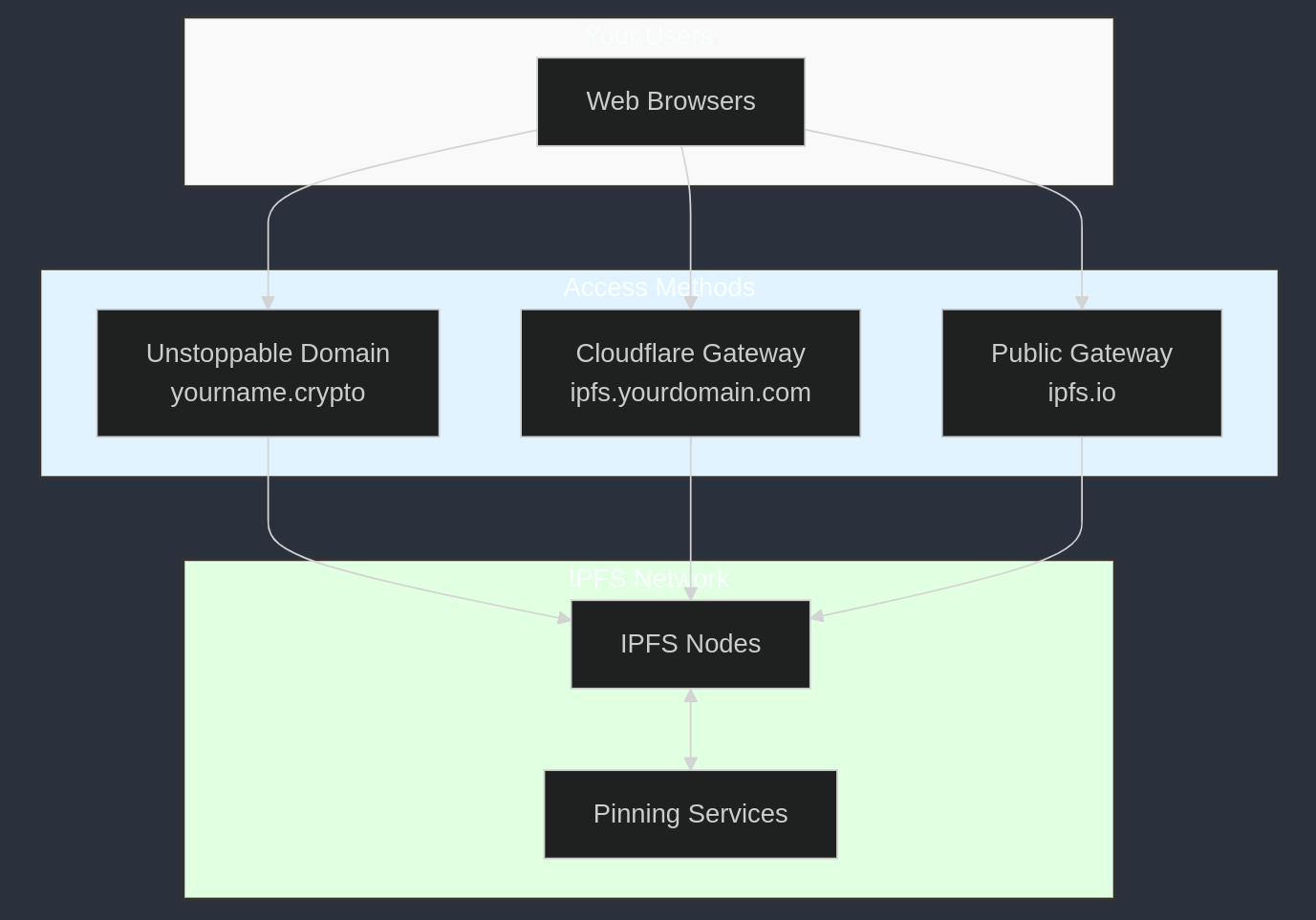
Architecture of a Decentralized Website using Unstoppable Domains, IPFS, and Cloudflare Web3 Gateways.
This architecture ensures your content remains accessible through multiple pathways, making your website resilient against failures and censorship.
Prerequisites
Before starting, make sure you have the following:
- Brave Browser: Download here. Brave comes with a built-in wallet, ideal for Web3 interactions.
- Ethereum (ETH): You’ll need some ETH in your wallet to purchase a domain.
- Cloudflare Account: Sign up at Cloudflare.
- Website Content: Have your site’s content ready to deploy.
- IPFS Desktop or Command-Line Tool: Download IPFS to upload your content to the network.
Tip: Accessing
.cryptodomains directly requires a Web3-enabled browser like Brave or a browser extension that supports Unstoppable Domains.
Domain Acquisition
Setting Up Your Unstoppable Domain
- Visit Unstoppable Domains: Go to unstoppabledomains.com.
- Search for Your Domain: Use the search bar to find an available domain (e.g.,
yourname.crypto). - Purchase the Domain: Add it to your cart and proceed to checkout.
- Connect Your Wallet: When prompted, connect your Brave Wallet to complete the transaction.
Tip: Keep an eye out for promotions—Unstoppable Domains often offers discounts or free domains for new users.
Once purchased, your domain can be resolved via:
- Direct Access (with a compatible browser):
https://yourname.crypto - Gateway Access:
https://ud.me/yourname.crypto
Example:
For instance, if you registered the domain profincognito.unstoppable, you can access it via:
https://ud.me/profincognito.unstoppable
Cloudflare Web3 Gateway Configuration
IPFS Gateway Setup
- Access Cloudflare Dashboard: Log in to your Cloudflare account.
- Navigate to Web3: In the dashboard, select the Web3 tab.
- Create a New IPFS Gateway:
- Gateway Type: IPFS DNSLink
- Hostname:
ipfs.yourdomain.com(e.g.,ipfs.profincognito.me)
Your gateway URL will look like:
https://ipfs.yourdomain.com/
Example:
https://ipfs.profincognito.me/
DNS Records Configuration
Add the following records to your Cloudflare DNS settings:
- CNAME Record:
- Type: CNAME
- Name:
ipfs.yourdomain.com - Content:
cloudflare-ipfs.com
- TXT Record:
- Type: TXT
- Name:
_dnslink.ipfs.yourdomain.com - Content:
"dnslink=/ipfs/YourContentHash"
Replace YourContentHash with the actual IPFS hash (CID) of your website content.
Example:
If your content hash is QmdzAcJAapp51CMSYPWepAdktxgWX9C1NTyCeLx2dAVw9i, your TXT record would be:
- Content:
"dnslink=/ipfs/QmdzAcJAapp51CMSYPWepAdktxgWX9C1NTyCeLx2dAVw9i"
Content Publication
Website Preparation Checklist
Before uploading, ensure:
- All Files Organized: Your website files are neatly organized in folders.
- Local Testing Complete: Test your site locally to catch any issues.
- Assets Optimized: Compress images and minify code for faster loading.
- Ready for IPFS: Your content is packaged and ready for distribution.
Uploading to IPFS
You have several options to host your content on IPFS:
1. Using IPFS Desktop or Command-Line Tool
-
Install IPFS: Download and install IPFS Desktop or the command-line tool.
-
Add Your Files:
-
For IPFS Desktop: Click on “Add to IPFS” and select your website folder.
-
For CLI:
ipfs add -r /path/to/your/website
-
-
Note Your Content Hash: After uploading, you’ll receive a CID (Content Identifier). This is your
YourContentHash.
2. Using Pinning Services
- Sign Up for a Service: Create an account with services like Pinata or Infura.
- Upload Your Content: Follow the service’s instructions to upload your website files.
- Retrieve Your Content Hash: After uploading, note the CID provided.
Pros and Cons
- Self-Hosted Node:
- Pros: Maximum control and true decentralization.
- Cons: Requires technical expertise and constant uptime.
- Pinning Services:
- Pros: Easier to manage; services handle hosting.
- Cons: Introduces a level of trust in third-party services.
Tip: Always verify your uploads through multiple gateways before updating your DNS records to ensure proper distribution across the IPFS network.
Testing Your Upload Across Gateways:
# Replace $SITE_HASH with your actual content hash
curl -I https://ipfs.io/ipfs/$SITE_HASH
curl -I https://cloudflare-ipfs.com/ipfs/$SITE_HASH
curl -I https://gateway.pinata.cloud/ipfs/$SITE_HASH
Example:
Using the content hash QmdzAcJAapp51CMSYPWepAdktxgWX9C1NTyCeLx2dAVw9i:
curl -I https://ipfs.io/ipfs/QmdzAcJAapp51CMSYPWepAdktxgWX9C1NTyCeLx2dAVw9i/
Access Methods
Your decentralized site will be accessible through multiple pathways:
- Primary Domain:
https://yourname.crypto(Requires a Web3-enabled browser like Brave or an extension)
- Cloudflare Gateway:
https://ipfs.yourdomain.com
- Unstoppable Domains Gateway:
https://ud.me/yourname.crypto
- Direct IPFS Access:
https://ipfs.io/ipfs/YourContentHash
Example:
- Primary Domain:
https://profincognito.unstoppable
- Cloudflare Gateway:
https://ipfs.profincognito.me/
- Direct IPFS Access:
https://ipfs.io/ipfs/QmdzAcJAapp51CMSYPWepAdktxgWX9C1NTyCeLx2dAVw9i/
Security Best Practices
Protection Measures
-
Wallet Security:
- Enable all security features in Brave Wallet.
- Securely store your recovery phrases offline.
- Consider using a hardware wallet for significant assets.
-
Infrastructure Security:
- Activate Cloudflare’s security features like SSL/TLS encryption and firewall rules.
- Document all configurations for future reference.
- Maintain regular backups of your site and configurations.
Content Resilience
- Pin Content: Use multiple pinning services to ensure your content stays available.
- Local Backups: Always keep a local copy of your website files.
- Documentation: Keep detailed notes on your setup and configurations.
- Regular Testing: Periodically test your site’s accessibility from different gateways.
Troubleshooting Guide
Content Updates Not Appearing?
- Verify DNSLink Record: Ensure your TXT record points to the correct IPFS hash.
- Confirm IPFS Hash: Double-check that you’re using the latest content hash.
- Propagation Time: Wait for DNS changes to propagate (can take up to 24 hours).
- Clear Caches: Clear your browser and DNS cache.
Domain Resolution Issues?
- Check Wallet Connection: Make sure your Brave Wallet is connected and functioning.
- Review DNS Configurations: Ensure all DNS records are correctly set up in Cloudflare.
- Wait for Updates: DNS changes may take time to propagate globally.
- Test Alternative Access: Try accessing via different gateways or devices.
Future Enhancements
Consider implementing advanced features to enhance your decentralized site:
- Automated Deployment: Use CI/CD pipelines for seamless updates.
- Content Update Automation: Automate IPFS pinning and DNS updates.
- Web3 Integration: Incorporate smart contracts or dApps for interactive experiences.
- Additional Decentralized Services: Explore decentralized storage or compute services for a fully decentralized stack.
Essential Resources
- Unstoppable Domains Documentation: support.unstoppabledomains.com
- Cloudflare Web3 Documentation: developers.cloudflare.com/web3/
- IPFS Documentation: docs.ipfs.tech
- Brave Wallet Guide: brave.com/wallet/
Conclusion
You’ve taken a significant step toward embracing the future of the internet by setting up a decentralized web presence. Remember:
- Secure Integration: Brave Wallet ensures safe interactions with Web3 technologies.
- Multiple Access Paths: Diversify access methods for maximum resilience.
- Inherent Resilience: Decentralization offers robustness against failures and censorship.
- Complete Control: You own your domain and content outright.
Welcome to the new era of the web!
]]>Warning: The Web3 ecosystem evolves rapidly. Always refer to the latest documentation and best practices to stay updated and maintain security.