<?xml version="1.0" encoding="utf-8" standalone="yes"?>
<feed xmlns="http://www.w3.org/2005/Atom">
  <title>Browser-Security on Sooraj Sathyanarayanan</title>
  <link rel="alternate" href="https://profincognito.me/tags/browser-security/" />
  <link rel="self" href="https://profincognito.me/tags/browser-security/index.xml" />
  <subtitle>Recent content in Browser-Security on Sooraj Sathyanarayanan</subtitle>
  <id>https://profincognito.me/tags/browser-security/</id>
  <generator uri="http://gohugo.io" version="0.147.8">Hugo</generator>
  <language>en-us</language>
  <updated>2026-05-25T14:44:10-07:00</updated>
  <author>
    <name>Sooraj Sathyanarayanan</name>
    
  </author>
  <rights>[CC BY-SA 4.0](https://creativecommons.org/licenses/by-sa/4.0/)</rights>
      <entry>
        <title>Comparing Browser Engine Security: Chromium, Gecko, WebKit</title>
        <link rel="alternate" href="https://profincognito.me/blog/security/browser-engine-security-comparison/" />
        <id>https://profincognito.me/blog/security/browser-engine-security-comparison/</id>
        <published>2026-03-04T00:00:00Z</published>
        <updated>2026-05-25T14:44:10-07:00</updated>
        <summary type="html">A deep-dive into multi-process sandboxing, exploit mitigations, memory safety, extension security, and specialized hardened Chromium forks like Vanadium (for GrapheneOS) and Trivalent (for desktop Linux).</summary>
          <content type="html"><![CDATA[<p>Web browsers are our primary gateway to the internet—and a significant magnet for exploits. Attackers target browsers in search of remote code execution, credential theft, or advanced side-channel leaks. In response, modern browsers incorporate multi-process architectures, robust sandboxes, memory-safe rewrites, and rapid patch cycles.</p>
<p>This post reviews <strong>Chromium</strong>, <strong>Gecko (Firefox)</strong>, and <strong>WebKit (Safari)</strong>, detailing their security models and known gaps. We’ll also focus on specialized hardened forks like <strong>Vanadium</strong> (on GrapheneOS for mobile) and <strong>Trivalent</strong> (for desktop Linux), both of which significantly enhance Chromium’s baseline security features. By contrasting these engines, we get a clearer picture of what truly modern browser security can look like—and why it matters for both mobile and desktop users.</p>
<h2 id="overview-of-major-engines">Overview of Major Engines</h2>
<h3 id="chromium">Chromium</h3>
<ul>
<li><strong>Maintainers</strong>: Google + open-source community</li>
<li><strong>Used By</strong>: Google Chrome, Microsoft Edge, <strong>Brave</strong>, Opera, <strong>Vanadium</strong> (GrapheneOS), <strong>Trivalent</strong> (Desktop Linux), and more</li>
<li><strong>Security Model</strong>:
<ul>
<li>Strong multi-process architecture (Site Isolation)</li>
<li>Robust sandboxing (seccomp-bpf on Linux, win32k lockdown on Windows, etc.)</li>
<li>Frequent updates (~4-week release cycle), tight zero-day patch turnaround</li>
<li>Memory safety moves: Rust integration in selected components, advanced mitigations like Control Flow Integrity (CFI), AddressSanitizer in dev builds</li>
</ul>
</li>
<li><strong>Recent Innovations</strong>:
<ul>
<li><strong>BackupRefPtr</strong> and “MiraclePtr” in PartitionAlloc to defeat use-after-free bugs</li>
<li>Dedicated Network Service Sandbox</li>
<li>Fine-grained site isolation (one process per domain/iframe group)</li>
</ul>
</li>
</ul>
<h3 id="gecko-firefox">Gecko (Firefox)</h3>
<ul>
<li><strong>Maintainer</strong>: Mozilla Foundation</li>
<li><strong>Used By</strong>: Mozilla Firefox, Tor Browser</li>
<li><strong>Security Highlights</strong>:
<ul>
<li>Ongoing multi-process expansion (“Electrolysis” → “Fission” for site isolation)</li>
<li>Heavy Rust usage (CSS, URL parsing, AV1 decoder), RLBox library sandboxing</li>
<li>ESR (Extended Support Release) for enterprise and Tor</li>
</ul>
</li>
<li><strong>Known Gaps</strong>:
<ul>
<li>Historically weaker sandbox than Chromium, especially on Linux/Android</li>
<li>Fission not yet as mature as Chromium’s site-per-process approach</li>
<li>Android Firefox does not use <code>isolatedProcess</code>, weakening content-process isolation</li>
</ul>
</li>
</ul>
<h3 id="webkit-safari">WebKit (Safari)</h3>
<ul>
<li><strong>Maintainer</strong>: Apple + open-source</li>
<li><strong>Used By</strong>: Safari on macOS/iOS, and all iOS-based browsers (App Store policy)</li>
<li><strong>Security Highlights</strong>:
<ul>
<li>Process separation (UI vs. WebContent)</li>
<li>Deep OS-level integration (Pointer Authentication on ARM64, strict code signing on iOS)</li>
<li>JIT hardening in JavaScriptCore</li>
</ul>
</li>
<li><strong>Release Model</strong>:
<ul>
<li>Often tied to Apple’s OS updates, though Apple can ship out-of-band fixes</li>
<li>Site isolation is more limited than Chromium’s, but offset by strong OS-level sandbox entitlements and pointer authentication</li>
</ul>
</li>
</ul>
<h2 id="vanadium-hardened-chromium-for-grapheneos">Vanadium: Hardened Chromium for GrapheneOS</h2>
<p><a href="https://grapheneos.org"><strong>GrapheneOS</strong></a> is a security-focused Android-based OS that tightens SELinux policies, app permissions, and compiler hardening. <strong>Vanadium</strong> is its default browser and system WebView—<strong>a hardened Chromium fork</strong> specialized for Android.</p>
<ol>
<li><strong>Strict Site Isolation</strong> on Android, matching desktop Chrome (Android Chrome often relaxes it to save RAM).</li>
<li><strong>Aggressive Exploit Mitigations</strong>:
<ul>
<li>Zero-initialization of local variables (disabled in stock Chrome for performance)</li>
<li>Type-based CFI, stronger stack canaries</li>
<li>Upstream features like BackupRefPtr in PartitionAlloc are fully enabled.</li>
</ul>
</li>
<li><strong>OS-Level Synergy</strong>:
<ul>
<li>Each Vanadium renderer runs as an <code>isolatedProcess</code> under GrapheneOS, restricting syscalls beyond Chrome’s defaults.</li>
<li>GrapheneOS adds toggles for system sensors, microphone, camera, etc., which complements Vanadium’s security posture.</li>
</ul>
</li>
</ol>
<p>By integrating with GrapheneOS’s broader OS-level approach, <strong>Vanadium</strong> significantly raises the bar for exploit success on mobile devices. However, Vanadium is exclusive to GrapheneOS—stock Android does not provide this level of per-process hardening.</p>
<h2 id="trivalent-hardened-chromium-for-desktop-linux">Trivalent: Hardened Chromium for Desktop Linux</h2>
<p>While Vanadium focuses on Android, <strong>Trivalent</strong> targets <strong>desktop Linux</strong> with a similarly hardened Chromium approach. Developed by <a href="https://github.com/secureblue/secureblue">secureblue</a> and inspired by Vanadium, Trivalent uses Fedora’s Chromium RPM as a base, then applies a suite of security-minded patches and configuration changes:</p>
<ul>
<li><strong>Desktop-Relevant Patches from Vanadium</strong>:<br>
Trivalent adopts or adapts Vanadium’s security enhancements where relevant to desktop environments (e.g., stricter sandbox flags, forced site isolation).</li>
<li><strong>Integration with <a href="https://github.com/GrapheneOS/hardened_malloc">hardened_malloc</a></strong>:<br>
Bundled with secureblue’s packages, giving better heap protections and runtime checks than typical system allocators.</li>
<li><strong>Opt-In Secondary Features</strong>:
<ul>
<li>Password manager, search suggestions, and usage metrics are disabled or made optional.</li>
<li>The idea is to remove potential privacy or data collection surfaces unless specifically enabled by the user.</li>
</ul>
</li>
<li><strong>Additional Hardening Flags</strong>:
<ul>
<li><code>chrome://flags/#show-punycode-domains</code> (prevents IDN homograph attacks)</li>
<li><code>chrome://flags/#clear-cross-origin-referrers</code> (reduces cross-site tracking/leakage)</li>
<li>Strict popup blocking, network service sandbox toggles, etc.</li>
</ul>
</li>
</ul>
<p>Trivalent is especially interesting for users on Fedora or other RPM-based Linux distros, though it may be ported or used on others. While it’s not an official GrapheneOS product, Trivalent’s approach aligns with Vanadium: <strong>retain Chrome’s robust security baseline and add further compiler, runtime, and build-time hardening</strong>.</p>
<h2 id="process-architecture--sandboxing">Process Architecture &amp; Sandboxing</h2>
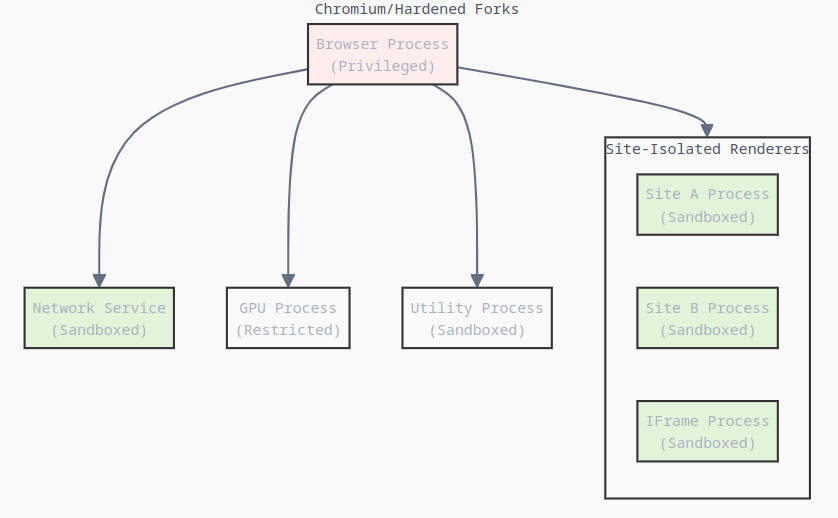
<h3 id="chromium--its-hardened-forks-vanadium-trivalent">Chromium &amp; Its Hardened Forks (Vanadium, Trivalent)</h3>
<ul>
<li><strong>Site-Per-Process (Site Isolation)</strong>:<br>
Each site runs in its own renderer, enforced by a strict inter-process communication model. Attackers escaping one site’s sandbox typically cannot pivot to another.</li>
<li><strong>Sandbox Depth</strong>:
<ul>
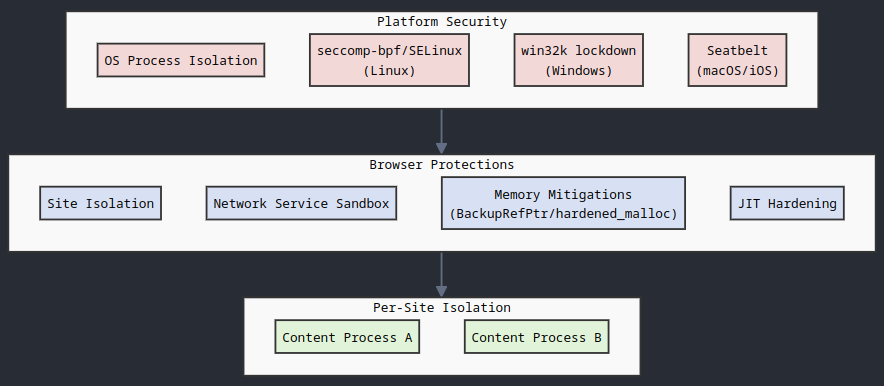
<li>On Linux, <strong>seccomp-bpf</strong> restricts syscall usage to a minimal subset.</li>
<li>On Windows, <strong>win32k lockdown</strong> cuts off a large chunk of kernel attack surface.</li>
<li>On macOS, Chromium integrates with seatbelt entitlements.</li>
</ul>
</li>
<li><strong>Network Service Sandbox</strong>:
<ul>
<li>A separate process for network tasks is heavily locked down, reducing the risk of turning protocol parser bugs into OS-level compromises.</li>
</ul>
</li>
<li><strong>Desktop vs. Mobile</strong>:
<ul>
<li><strong>Trivalent</strong> enforces these sandbox policies on Linux desktops, occasionally enabling extra flags like stricter GPU process isolation.</li>
<li><strong>Vanadium</strong> uses <code>isolatedProcess</code> for each renderer on Android, matching or exceeding desktop-level isolation.</li>
</ul>
</li>
</ul>
<p><img loading="lazy" src="/images/content/blog-security-browser-engine-security-comparison-2683e8c5-8491-4293-a080-d7a8ba7f84e0.png" alt="image" />
</p>
<h3 id="firefox-gecko">Firefox (Gecko)</h3>
<ul>
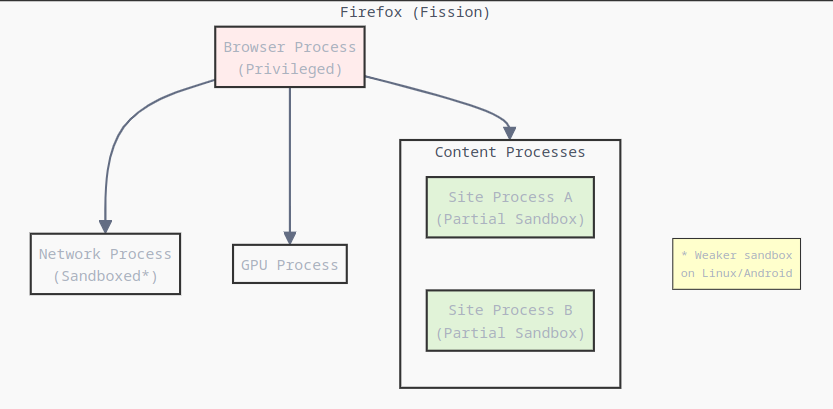
<li><strong>Fission</strong>:
<ul>
<li>Rolling out site isolation, still behind Chromium in coverage and maturity.</li>
</ul>
</li>
<li><strong>Sandbox Shortcomings</strong>:
<ul>
<li>On Linux, content processes can access X11, PulseAudio, etc., which are known sandbox-escape vectors.</li>
<li>On Android, there’s no usage of <code>isolatedProcess</code> for the renderer.</li>
</ul>
</li>
<li><strong>RLBox</strong>:
<ul>
<li>Sandboxes certain risky libraries in WebAssembly, preventing direct memory corruption from impacting the main process. It’s an interesting approach but doesn’t fully compensate for weaker multi-process architecture.</li>
</ul>
</li>
</ul>
<p><img loading="lazy" src="/images/content/blog-security-browser-engine-security-comparison-bf59f6e4-7483-486f-a62d-b2aac8eab1d5.png" alt="image" />
</p>
<h3 id="safari-webkit">Safari (WebKit)</h3>
<ul>
<li><strong>Multi-Process</strong> with UI vs. WebContent separation.</li>
<li><strong>Tight Integration</strong>:
<ul>
<li>On iOS, the entire app environment is heavily sandboxed, plus Pointer Authentication on Apple Silicon.</li>
<li>On macOS, Safari’s sandbox also leverages system entitlements, though not as granular as Chromium’s site-per-process.</li>
</ul>
</li>
<li><strong>JIT Hardening</strong>:
<ul>
<li>JavaScriptCore uses pointer authentication on ARM64, limiting trivial code reuse attacks.</li>
<li>Apple invests heavily in in-house fuzzing, though less is publicly documented.</li>
</ul>
</li>
</ul>
<hr>
<h3 id="security-boundaries-overview">Security Boundaries Overview</h3>
<p><img loading="lazy" src="/images/content/blog-security-browser-engine-security-comparison-76d3ac40-73bb-43f8-9c1e-50abfede38a9.png" alt="image" />
</p>
<hr>
<h2 id="memory-safety--exploit-mitigations">Memory Safety &amp; Exploit Mitigations</h2>
<h3 id="backuprefptr-miracleptr--hardened-allocators">BackupRefPtr, MiraclePtr &amp; Hardened Allocators</h3>
<ul>
<li><strong>Chromium &amp; Forks</strong>:
<ul>
<li><strong>PartitionAlloc</strong> + <strong>BackupRefPtr</strong>: Prevents silent pointer invalidation, mitigating a key class of use-after-free exploits.</li>
<li><strong>MiraclePtr</strong>: Potential future reference-counted approach.</li>
<li><strong>hardened_malloc</strong>: In Trivalent’s desktop context, bundling with <strong>hardened_malloc</strong> can drastically reduce exploit viability by forcing deterministic crash or detection on memory corruption.</li>
</ul>
</li>
<li><strong>Firefox</strong>:
<ul>
<li>Relies on Rust for new components, but older C++ code doesn’t benefit from something like BackupRefPtr.</li>
<li>mozjemalloc is not as hardened as PartitionAlloc with advanced pointer protection.</li>
</ul>
</li>
<li><strong>WebKit (Safari)</strong>:
<ul>
<li>Mostly uses system allocators on macOS/iOS. Apple is rumored to be exploring memory tagging or other hardware-based checks, but details are sparse.</li>
</ul>
</li>
</ul>
<h3 id="javascript-engines">JavaScript Engines</h3>
<p>All modern browsers rely on powerful JIT compilers, each with its own design:</p>
<ul>
<li><strong>V8 (Chromium, Vanadium, Trivalent)</strong>
<ul>
<li>Uses TurboFan and other optimization pipelines.</li>
<li>Enforces W^X (no memory region is writable and executable at the same time).</li>
<li>Integrates with OS-level mitigations on Windows, macOS, Linux, and Android.</li>
</ul>
</li>
<li><strong>SpiderMonkey (Firefox)</strong>
<ul>
<li>Uses IonMonkey/Warp for optimization.</li>
<li>RLBox in Firefox can sandbox some third-party libraries, but it’s not used for the entire JIT pipeline.</li>
</ul>
</li>
<li><strong>JavaScriptCore (Safari)</strong>
<ul>
<li>Uses the FTL JIT pipeline.</li>
<li>On Apple Silicon, leverages Pointer Authentication to cryptographically sign code pointers.</li>
</ul>
</li>
</ul>
<p>Key mitigations across engines often include pointer authentication (on supported hardware), guard pages, constant blinding, and fuzzing. <strong>Vanadium</strong> and <strong>Trivalent</strong> inherit V8’s advanced JIT mitigations from upstream Chromium, with additional sandbox or build-time hardening where possible.</p>
<h2 id="additional-privacy--usability-considerations">Additional Privacy &amp; Usability Considerations</h2>
<h3 id="avoiding-privacy-theater">Avoiding “Privacy Theater”</h3>
<ul>
<li>Overloading browsers with privacy-centric add-ons often backfires by making your configuration more unique and fingerprintable.</li>
<li>Vanadium, Trivalent, and many hardened browser efforts prefer <strong>secure defaults</strong> with minimal code or extension overhead. They typically disable or make optional telemetry, password managers, or search suggestions that phone home by default—striking a balance between privacy and maintainable security.</li>
</ul>
<h3 id="tor-browser-vs-hardened-chromium-forks">Tor Browser vs. Hardened Chromium Forks</h3>
<ul>
<li><strong>Tor Browser</strong> tries to unify fingerprints but is still based on Firefox, which has weaker sandboxing.</li>
<li><strong>Trivalent</strong> or <strong>Vanadium</strong> can be combined with a local or external Tor proxy/VPN, yet benefit from the robust multi-process architecture and advanced exploit mitigations in Chromium.</li>
<li>If anonymity is top priority, you might still prefer Tor Browser. But for raw exploit resistance, hardened Chromium forks typically outpace it.</li>
</ul>
<h2 id="browser-extension-security-models">Browser Extension Security Models</h2>
<p>Extension frameworks can broaden a browser’s functionality but also introduce new attack surfaces. The major engines approach extension security differently:</p>
<ul>
<li><strong>Chromium (Manifest V2 → V3)</strong>
<ul>
<li>Migrating from Manifest V2 to V3, restricting certain APIs (like background scripts, network request modifications) to reduce abuse.</li>
<li>Sandboxes extensions to limit direct OS access. Still, a malicious extension can pose risks if it gains sufficient permissions.</li>
</ul>
</li>
<li><strong>Firefox (WebExtensions)</strong>
<ul>
<li>Aims for Chrome compatibility with “WebExtensions,” but supports some legacy APIs.</li>
<li>Security model is somewhat stricter than older XUL-based extensions but can still be a vector for attacks or privacy leaks.</li>
</ul>
</li>
<li><strong>Safari (Safari Web Extensions)</strong>
<ul>
<li>Generally aligned with the WebExtensions model, but with Apple’s own provisioning approach.</li>
<li>Extensions must be signed and distributed via Apple’s channels on iOS, adding an extra layer of gatekeeping.</li>
</ul>
</li>
</ul>
<p>Hardened forks like <strong>Vanadium</strong> or <strong>Trivalent</strong> may disable or limit extension functionality by default—or allow them only under certain conditions—to reduce the overall attack surface. In all cases, extension curation and strong permission boundaries are essential for safe usage.</p>
<h2 id="supply-chain-security--reproducible-builds">Supply Chain Security &amp; Reproducible Builds</h2>
<ul>
<li><strong>Vanadium</strong>
<ul>
<li>Ships as part of GrapheneOS, which aims for reproducible builds and close upstream tracking of Chromium changes.</li>
<li>GrapheneOS is open source, so the entire build process is transparent, albeit specialized for Pixel devices.</li>
</ul>
</li>
<li><strong>Trivalent</strong>
<ul>
<li>Provided by <a href="https://github.com/secureblue/secureblue">secureblue</a> via Fedora COPR or direct RPMs.</li>
<li>Desktop-based approach to keep patches consistent, tested for each new Chromium release.</li>
<li>Encourages reproducible build techniques so that others can verify the binaries match the published source.</li>
</ul>
</li>
<li><strong>Firefox &amp; Safari</strong>
<ul>
<li>Mozilla publishes frequent security advisories and open-source code; some parts of the build can be verified reproducibly, but it’s not fully guaranteed for all releases.</li>
<li>Apple’s model is more closed; Safari updates are often tied to macOS/iOS releases, although out-of-band patches do appear. Reproducibility is limited to Apple’s internal processes.</li>
</ul>
</li>
</ul>
<h2 id="emerging-trends--future-directions">Emerging Trends &amp; Future Directions</h2>
<ol>
<li><strong>Expanded Memory Tagging</strong>
<ul>
<li>Apple’s rumored memory tagging might soon be mirrored on ARM-based Linux or Android devices, further containing heap corruption.</li>
</ul>
</li>
<li><strong>Advanced Sandbox Layers</strong>
<ul>
<li>Chrome’s Network Service Sandbox could be a precursor to even more service-specific sandboxes (e.g., PDF or font isolation).</li>
<li>Firefox continues exploring process priority management and RLBox expansions.</li>
</ul>
</li>
<li><strong>Ephemeral or Containerized Browsing</strong>
<ul>
<li>Desktop OSes like Qubes OS push ephemeral VMs for each browsing session. Mobile and standard Linux might adopt smaller “container” approaches.</li>
</ul>
</li>
<li><strong>Increasing Rust or Memory-Safe Rewrites</strong>
<ul>
<li>Chromium is expanding Rust usage, while Mozilla doubles down on it. WebKit’s public progress is less clear.</li>
</ul>
</li>
</ol>
<h2 id="conclusions">Conclusions</h2>
<p><strong>Chromium</strong> stands out for its rigorous sandbox, advanced site isolation, and continuous exploit mitigations.</p>
<p>Among <strong>hardened forks</strong>:</p>
<ul>
<li>
<p><strong>Vanadium</strong> (GrapheneOS) shows what’s possible on <strong>Android</strong>:</p>
<ul>
<li>Strict site isolation, aggressive compiler flags, synergy with GrapheneOS’s <code>isolatedProcess</code> usage.</li>
<li>Continual patches from upstream, with security-driven customizations for negligible performance cost.</li>
</ul>
</li>
<li>
<p><strong>Trivalent</strong> (Desktop Linux) offers a <strong>similar</strong> approach:</p>
<ul>
<li>Desktop-centric patches inspired by Vanadium, integrating <strong>hardened_malloc</strong> and extra security toggles.</li>
<li>Minimizes or opts out of features that might reduce security or add unneeded telemetry.</li>
<li>Especially appealing on Fedora or RPM-based distributions looking for a secure, hardened Chromium replacement.</li>
</ul>
</li>
</ul>
<p><strong>Brave</strong> also deserves mention as a popular Chromium-based browser. It focuses on <strong>privacy features</strong>—such as built-in ad and tracker blocking, plus Tor integration in private windows—yet it still benefits from Chromium’s sandbox. It’s generally <strong>not as hardened</strong> against exploits. Still, <strong>Brave</strong> remains a strong choice for users seeking an easier out-of-the-box privacy experience over standard Chrome.</p>
<p>Ultimately, if <strong>raw exploit resistance</strong> is your goal, a hardened Chromium variant—like <strong>Vanadium</strong> on GrapheneOS or <strong>Trivalent</strong> on desktop Linux—provides some of the best defenses available today. Coupled with responsible user practices, these projects represent a leading edge of browser security, bridging upstream progress with deeper, platform-specific hardening.</p>
<h2 id="references--further-reading">References &amp; Further Reading</h2>
<ul>
<li><a href="https://www.chromium.org/Home/chromium-security/">Chromium Security Documentation</a></li>
<li><a href="https://wiki.mozilla.org/Project_Fission">Mozilla Fission (Site Isolation)</a></li>
<li><a href="https://webkit.org/category/security/">WebKit Security Policy</a></li>
<li><a href="https://github.com/GrapheneOS/Vanadium">Vanadium on GrapheneOS</a></li>
<li><a href="https://github.com/secureblue/Trivalent">Trivalent on GitHub</a></li>
<li><a href="https://github.com/GrapheneOS/hardened_malloc">hardened_malloc by GrapheneOS</a></li>
<li><a href="https://chromium.googlesource.com/chromium/src/+/ddc017f9569973a731a574be4199d8400616f5a5/base/memory/raw_ptr.md">BackupRefPtr &amp; MiraclePtr in Chromium</a></li>
<li><a href="https://blog.mozilla.org/attack-and-defense/2021/12/06/webassembly-and-back-again-fine-grained-sandboxing-in-firefox-95">Firefox Sandboxing (Mozilla Blog)</a></li>
<li><a href="https://developer.arm.com/-/media/Arm%20Developer%20Community/PDF/Arm_Memory_Tagging_Extension_Whitepaper.pdf">ARM Memory Tagging</a></li>
<li><a href="https://www.qubes-os.org/doc/disposablevm/">Qubes OS Documentation on Disposable VMs</a></li>
<li><a href="https://developer.chrome.com/docs/extensions/mv3/intro/">Chrome Manifest V3 Overview</a></li>
</ul>
]]></content>
      </entry>
      <entry>
        <title>secureblue: Redefining Security in Linux Desktop Operating Systems</title>
        <link rel="alternate" href="https://profincognito.me/blog/security/secureblue/" />
        <id>https://profincognito.me/blog/security/secureblue/</id>
        <published>2026-03-04T00:00:00Z</published>
        <updated>2026-05-25T14:44:10-07:00</updated>
        <summary type="html">An in-depth look at secureblue, a security-hardened Linux distribution built on Fedora Atomic that aims to be the most secure desktop Linux OS while maintaining usability.</summary>
          <content type="html"><![CDATA[<p>In today&rsquo;s online landscape, security is paramount. With cyber threats becoming increasingly sophisticated, users need an operating system that not only provides robust security features but also maintains usability. <strong>secureblue</strong> emerges as a promising solution, aiming to redefine the standards of security in Linux desktop environments.</p>
<h2 id="what-is-secureblue">What is secureblue?</h2>
<p><strong>secureblue</strong> is a project that builds upon Fedora Atomic&rsquo;s base images to create <strong>hardened operating system images</strong>. Utilizing <strong>BlueBuild</strong>, it generates OS images with enhanced security measures designed to protect against both known and unknown vulnerabilities. secureblue&rsquo;s goal is to increase defenses without sacrificing usability for most use cases.</p>
<p>It&rsquo;s important to note that secureblue&rsquo;s mission is focused: <strong>to be the most secure desktop Linux OS</strong>. It does not claim to be the most secure desktop OS overall, as other systems like macOS have significant security advantages such as full verified boot. secureblue is designed for users whose first priority is using desktop Linux, with security as a second priority.</p>
<p>The project was founded and is being developed by <a href="https://github.com/RoyalOughtness">RoyalOughtness</a>.</p>
<h2 id="why-is-secureblue-based-on-fedora">Why is secureblue Based on Fedora?</h2>
<p>secureblue chooses <strong>Fedora</strong> as its base for two primary reasons:</p>
<ol>
<li>
<p><strong>SELinux Integration</strong>: Fedora ships with <strong>SELinux (Security-Enhanced Linux)</strong> in enforcing mode for system processes out of the box. SELinux provides a robust Mandatory Access Control (MAC) system that significantly enhances system security.</p>
</li>
<li>
<p><strong>Atomic Image Building</strong>: Fedora provides a robust ecosystem for <strong>atomic image building</strong>, which is essential for creating immutable operating system images that are easier to maintain and secure.</p>
</li>
</ol>
<p>While other distributions like NixOS were considered, they were ultimately not chosen due to SELinux compatibility issues stemming from their filesystem layout management.</p>
<h2 id="selinux-vs-apparmor">SELinux vs. AppArmor</h2>
<p>Both SELinux and AppArmor are Linux kernel security modules that provide Mandatory Access Control (MAC), but they differ in significant ways:</p>
<table>
  <thead>
      <tr>
          <th><strong>Feature</strong></th>
          <th><strong>SELinux</strong></th>
          <th><strong>AppArmor</strong></th>
      </tr>
  </thead>
  <tbody>
      <tr>
          <td><strong>Control Granularity</strong></td>
          <td>Fine-grained control over nearly every system aspect</td>
          <td>Profile-based restrictions with less granular control</td>
      </tr>
      <tr>
          <td><strong>Configuration Complexity</strong></td>
          <td>More complex, steeper learning curve</td>
          <td>Simpler to configure and manage</td>
      </tr>
      <tr>
          <td><strong>Policy Model</strong></td>
          <td>Type enforcement, roles, users</td>
          <td>Path-based access control</td>
      </tr>
      <tr>
          <td><strong>Default Implementation</strong></td>
          <td>Fedora, RHEL, CentOS</td>
          <td>Ubuntu, SUSE</td>
      </tr>
      <tr>
          <td><strong>Resource Requirements</strong></td>
          <td>Higher overhead</td>
          <td>Lower overhead</td>
      </tr>
      <tr>
          <td><strong>Security Depth</strong></td>
          <td>More comprehensive security model</td>
          <td>More straightforward but less detailed</td>
      </tr>
  </tbody>
</table>
<p><strong>Why SELinux?</strong> secureblue opts for SELinux because of its comprehensive security capabilities. The granular control allows secureblue to enforce strict security policies, making it harder for malicious applications to cause harm.</p>
<h2 id="key-features-of-secureblue">Key Features of secureblue</h2>
<p>secureblue introduces several enhancements to bolster system security:</p>
<h3 id="1-global-implementation-of-hardened_malloc">1. Global Implementation of hardened_malloc</h3>
<p>Replaces the default memory allocator with <strong><a href="https://github.com/GrapheneOS/hardened_malloc">hardened_malloc</a></strong>, which includes security enhancements to protect against various memory corruption vulnerabilities—even within Flatpak applications.</p>
<h3 id="2-hardened-chromium-browser-hardened-chromium">2. Hardened Chromium Browser (<code>hardened-chromium</code>)</h3>
<p>A security-enhanced version of Chromium, focusing on fortifying defenses against web-based attacks. Developed by the secureblue team, <code>hardened-chromium</code> provides:</p>
<ul>
<li><strong>Improved Sandboxing</strong>: Strengthens the isolation between browser processes.</li>
<li><strong>Security Patches</strong>: Incorporates the latest security fixes promptly.</li>
<li><strong>Strict Defaults</strong>: Configured with settings that prioritize security.</li>
</ul>
<p>For more details, visit the <a href="https://github.com/secureblue/hardened-chromium"><code>hardened-chromium</code> repository</a>.</p>
<h3 id="3-strict-sysctl-settings">3. Strict Sysctl Settings</h3>
<p>Adjusts numerous kernel parameters to enhance system security, such as:</p>
<ul>
<li>Limiting core dumps.</li>
<li>Restricting access to kernel logs.</li>
<li>Enhancing network security settings.</li>
</ul>
<h3 id="4-removal-of-suid-binaries">4. Removal of SUID Binaries</h3>
<p>By removing the <strong>SUID bit</strong> from several binaries and replacing their functionality with capabilities, secureblue reduces the risk of <strong>privilege escalation attacks</strong>.</p>
<h3 id="5-blacklisting-unused-kernel-modules">5. Blacklisting Unused Kernel Modules</h3>
<p>Minimizes the attack surface by <strong>preventing potential exploits</strong> that target seldom-used components. This is achieved by blacklisting unnecessary kernel modules.</p>
<h3 id="6-additional-security-enhancements">6. Additional Security Enhancements</h3>
<ul>
<li><strong>Disabling Unnecessary Services</strong>: Services like <code>cups</code>, <code>geoclue</code>, and others are disabled by default.</li>
<li><strong>Secure DNS Configurations</strong>: Implements opportunistic DNSSEC and DNS-over-TLS with <code>systemd-resolved</code>.</li>
<li><strong>User Account Protection</strong>: Implements brute-force protection and enforces strong password policies.</li>
<li><strong>Container and Flatpak Security</strong>: Adjusts policies for safer application management.</li>
</ul>
<h2 id="why-is-chromium-chosen-over-firefox">Why is Chromium Chosen Over Firefox?</h2>
<p>The choice of Chromium over Firefox is based on significant technical security advantages:</p>
<ol>
<li>
<p><strong>Site Isolation</strong></p>
<ul>
<li><strong>Chromium</strong>: Has had complete <strong>site isolation</strong> implementation for years, meaning each site runs in its own process, reducing the risk of cross-site attacks.</li>
<li><strong>Firefox</strong>: Still lacks complete site isolation, making it more vulnerable to certain types of exploits.</li>
</ul>
</li>
<li>
<p><strong>Sandbox Strength</strong></p>
<ul>
<li><strong>Chromium</strong>: Offers a robust sandboxing mechanism that isolates processes effectively.</li>
<li><strong>Firefox</strong>: Sandbox implementation is comparatively weaker, potentially allowing malicious code to affect the system.</li>
</ul>
</li>
<li>
<p><strong>Base Security</strong></p>
<ul>
<li>Even without hardening, Chromium provides better security than Firefox due to its architecture and security model.</li>
</ul>
</li>
<li>
<p><strong>Hardening Potential</strong></p>
<ul>
<li>Chromium&rsquo;s architecture allows for additional security enhancements through hardening, which the secureblue team leverages in <code>hardened-chromium</code>.</li>
</ul>
</li>
</ol>
<p><strong>Note on Privacy vs. Security</strong>: When security and privacy considerations conflict, secureblue prioritizes <strong>security</strong>. Certain privacy-focused browsers like Brave or ungoogled-chromium may reduce security (e.g., enabling Manifest V2 extensions), and thus are not chosen as the base.</p>
<h2 id="comparison-with-other-secure-systems">Comparison with Other Secure Systems</h2>
<p>It&rsquo;s important to understand that secureblue serves different goals than other security-focused systems:</p>
<ul>
<li>
<p><strong>Qubes OS</strong>: Focuses on virtualization-based sandboxing using a hypervisor. While highly secure, it&rsquo;s a different approach compared to secureblue&rsquo;s focus on hardening the Linux desktop environment.</p>
</li>
<li>
<p><strong>macOS</strong>: Provides certain security advantages like <strong>full verified boot</strong> that aren&rsquo;t currently possible with desktop Linux. secureblue acknowledges these limitations but aims to be the most secure option within the Linux ecosystem.</p>
</li>
</ul>
<h2 id="getting-started-with-secureblue">Getting Started with secureblue</h2>
<p>For installation instructions and documentation, visit the <strong><a href="https://github.com/secureblue/secureblue/">secureblue GitHub repository</a></strong>. The installation process and requirements are maintained in the repository to ensure you always have access to the most current information.</p>
<h2 id="shoutout-to-bluebuild">Shoutout to BlueBuild</h2>
<p>secureblue utilizes <strong><a href="https://blue-build.org/">BlueBuild</a></strong>, an innovative tool for building immutable, versioned, and containerized operating system images. BlueBuild plays a crucial role in enabling secureblue to deliver robust and secure OS images efficiently.</p>
<h2 id="contributing-and-community">Contributing and Community</h2>
<p>secureblue welcomes contributions and community involvement:</p>
<ul>
<li>
<p><strong>Contributing</strong>: Start with the <a href="https://github.com/secureblue/secureblue/">secureblue repository</a> and its <a href="https://github.com/secureblue/secureblue/blob/live/docs/README.md">documentation</a> for current build and contribution context.</p>
</li>
<li>
<p><strong>Code of Conduct</strong>: Adhere to the project&rsquo;s <a href="https://github.com/secureblue/secureblue/blob/live/docs/CODE_OF_CONDUCT.md">Code of Conduct</a>.</p>
</li>
<li>
<p><strong>Community Support</strong>: Join discussions on the <strong><a href="https://discord.gg/DxqDExrhXW">secureblue Discord server</a></strong> to collaborate with other contributors and users.</p>
</li>
<li>
<p><strong>Donations</strong>: Consider supporting the project through <a href="https://github.com/sponsors/secureblue">GitHub Sponsors</a>.</p>
</li>
</ul>
<h2 id="conclusion">Conclusion</h2>
<p>secureblue represents a significant step forward in enhancing the security of Linux desktop operating systems. By building on Fedora&rsquo;s robust security features and adding its own layers of hardening, secureblue offers a compelling option for users who prioritize both Linux and security.</p>
<p>Whether you&rsquo;re an individual concerned about personal security or an organization seeking a more secure desktop environment, secureblue is worth exploring.</p>
<hr>
<p><strong>Have you tried secureblue? Share your thoughts and experiences!</strong></p>
]]></content>
      </entry>

</feed>